
When you’re running a business with 10 to 15 employees, you’re wearing a lot of hats. One minute you’re dealing with finances. The next you’re managing sales, marketing, HR, insurance, and IT. It’s easy for some things to fall through the cracks, especially when they don’t seem urgent.
Cybersecurity is often one of them (and we get it, so no judgment here). 🙂
Unfortunately, cybercriminals know that small businesses are busy. They know many organizations don’t have a dedicated IT team, formal security policies, or the budget of a large enterprise. That’s exactly why small businesses are a popular target.
On the other hand, protecting your business doesn’t have to be complicated.
As one of Canada’s Top 50 Managed Service Providers and a trusted IT partner in Niagara for more than 20 years, we’ve put together a simple cybersecurity checklist that every small business should review.
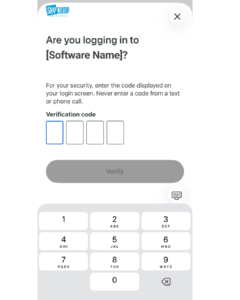
1. Do You Have Multi-Factor Authentication (MFA) Enabled Everywhere?
If you only implement one thing from this list, make it MFA.
Multi-factor authentication requires users to verify their identity using something more than just a password. Even if a cybercriminal steals a password, they still need a second form of verification to access the account.
Some of the most common MFA options include:
- Microsoft Authenticator (free)
- Google Authenticator (free)
- Passkeys (free on many modern devices)
- Physical security keys such as YubiKey (paid)
Think of MFA as a second lock on your front door. A password alone is no longer enough to adequately protect business accounts.
Why MFA Matters
- Prevents most password-based attacks
- Protects Microsoft 365 and email accounts
- Reduces the risk of business email compromise
- Easy to deploy for small businesses
Cybersecurity Tip: If a service offers MFA, turn it on.
2. Are You and Your Employees Using Strong Passwords?
Weak passwords remain one of the easiest ways for attackers to gain access to business systems.
Many people still use personal information such as:
- Pet names
- Birth years
- Family names
- Favourite sports teams
If you’ve posted it on social media, assume it could be used against you.
Yes, everyone knows Luna is a good girl. ≽^-⩊-^≼
That doesn’t mean Luna should be protecting your Microsoft account.
What Makes a Strong Password?
Focus on length over complexity.
Long passphrases are often more secure and easier to remember than short, complicated passwords.
Good example:
More3spre$$oLessDepress0
Less ideal:
P@$sw0rd2026
Why Strong Passwords Matter
- Harder to crack
- Easier for employees to remember
- Works better with password managers
- Reduces account compromise risk
3. Does Your Business Have an AI Usage Policy?
This is one of the newest cybersecurity challenges for small businesses. Many business owners assume they haven’t adopted AI yet.
Meanwhile, employees are already using:
- ChatGPT
- Microsoft Copilot
- Claude
- Gemini
- Other AI tools
The concern isn’t that employees are using AI but it is the concern about how they’re using it.
Questions Every Business Should Ask
- Can employees upload client information into AI tools?
- Can financial information be used in prompts?
- Which AI platforms are approved?
- What data should never leave the organization?
You don’t need a 50-page policy. Even a simple AI usage guideline and employee training session can dramatically reduce risk.
Why AI Governance Matters
- Protects sensitive business information
- Reduces accidental data leakage
- Creates consistency across teams
- Helps employees understand their responsibilities
You can watch our webinar recording to get better understanding of AI and Security (no unnecessary information, only useful tips)
4. Are You Using a Password Manager?
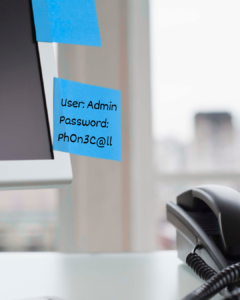
Let’s have an honest conversation. If passwords are stored in:
- Sticky notes
- Notebooks
- Excel spreadsheets
- Shared Word documents
It’s time for an upgrade.
A password manager securely stores credentials, generates strong passwords, and allows employees to access accounts safely.
Popular options include:
- Bitwarden
- Keeper
- 1Password
- LastPass
Benefits of a Password Manager
- Stronger passwords
- Reduced password reuse
- Secure sharing between employees
- Easier employee onboarding and offboarding
And yes…
Please remove that sticky note from your monitor.
5. Have You Trained Employees to Recognize Phishing Emails?
Most cyberattacks begin with a phishing email designed to trick someone into clicking a link, downloading a file, or sharing information. Modern phishing attacks look increasingly legitimate.
That’s why employee training remains one of the most effective cybersecurity investments available.
Employees Should Know How To Spot
- Fake invoices
- Password reset scams
- Business email compromise attacks
- Fake Microsoft 365 login pages
- Urgent requests from “executives”
Why Security Awareness Training Matters
- Reduces successful phishing attacks
- Builds confidence among employees
- Creates a stronger security culture
- Helps prevent costly mistakes
Looking for examples? Check out our phishing awareness blog posts for real-world scenarios and practical tips.
6. Do you have an Antivirus?
Microsoft Defender has improved significantly over the years, but many businesses benefit from additional layers of protection.
Solutions such as:
- SentinelOne
- ESET
- Webroot
help identify threats that humans may never notice.
Malicious files, suspicious behaviour, ransomware activity, and unusual processes can often be detected long before they become a major problem.
Let’s be honest. Human eyes can’t catch everything. That’s why having security systems continuously watching your devices is so important.
Small Changes Make a Big Difference
Cybersecurity doesn’t have to be overwhelming.
You don’t need a security operations center, a room full of servers, or a dedicated IT department to dramatically reduce your risk.
Start with the basics:
✅ Enable MFA
✅ Use strong passwords
✅ Create AI guidelines
✅ Implement a password manager
✅ Train your employees
✅ Deploy professional protection tools
These six steps won’t eliminate every cyber threat, but they’ll put you ahead of many small businesses and make you a much harder target.
Need a Second Opinion?
Not sure where your business stands?
At Skycomp Solutions, we help businesses across Niagara identify security gaps, improve cyber resilience, and build practical security strategies that fit their budget and business goals.
If you’d like some free advice or a friendly conversation about your current setup, we’re always happy to help.