
In 2026, phishing emails have become part of everyday business life.
If you run a company, your team is probably seeing suspicious emails on a regular basis. Some are easy to spot, but others look almost identical to real messages.
For many Skycomp clients, phishing awareness is something they practice regularly through simulations that feel very real.
Today, we want to give you a small glimpse of what that experience looks like.
Phishing emails are designed to trick people into taking action. This could mean clicking a link, entering a password, or downloading a file.
The challenge is that these emails are getting better. They often look like they come from trusted companies or even coworkers.
That is why awareness matters so much. When people know what to look for, they are much more likely to catch a phishing attempt before it causes a problem.
Can you catch a phishing email?
Below are three sample emails. Take a moment to review each one and ask yourself a simple question.
“Is this a phishing email or a genuine message?”
Try to go with your first instinct and see how you do.
In the next part of this post, we will go through each example and explain what gave it away.
Some answers will feel obvious once you see them. Others may surprise you.
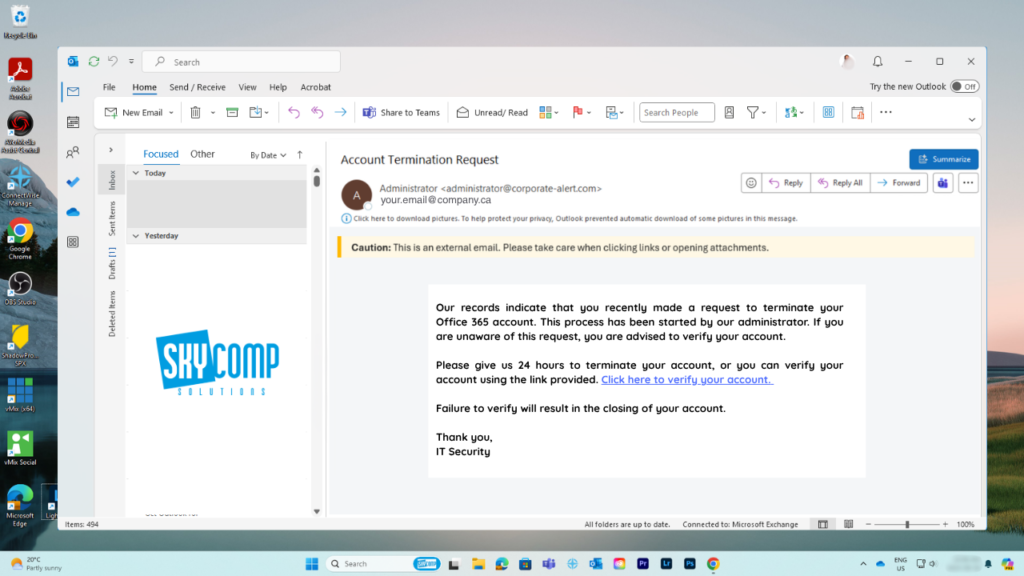
Your Account Termination
Have a closer look. Is it a genuine email or a phishing attempt?
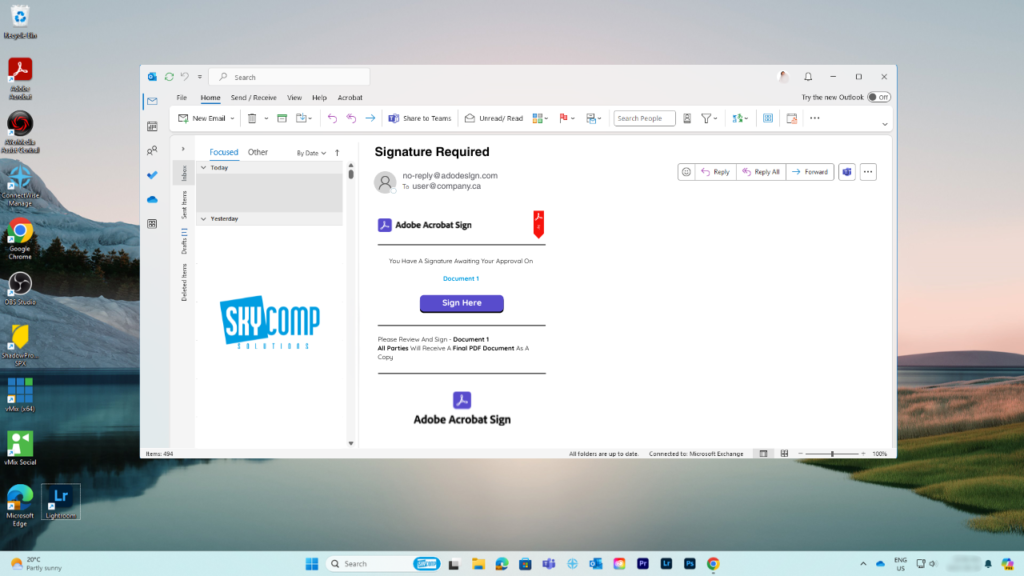
Adobe Acrobat Signature Request
What about this one?
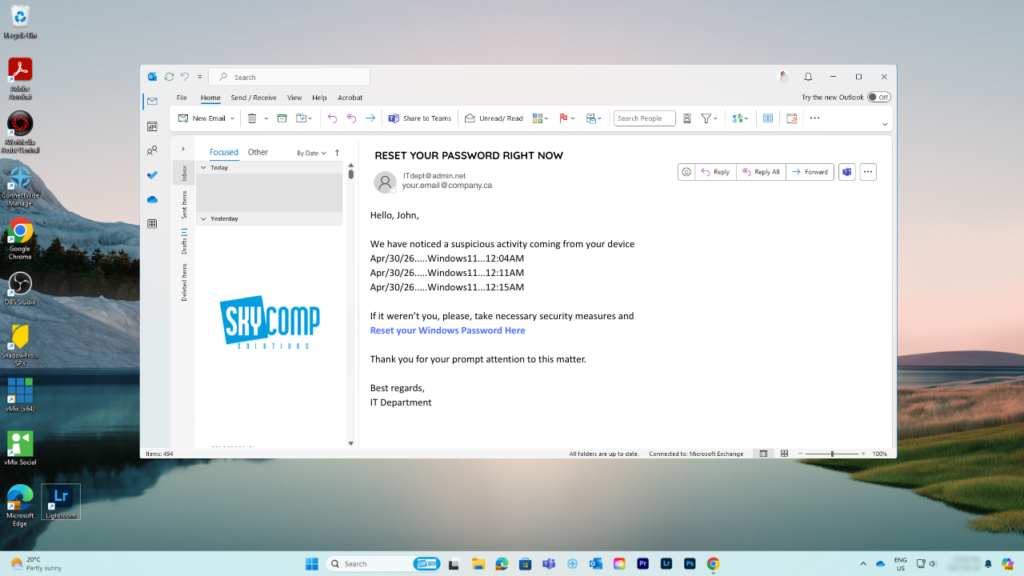
Message From IT Department
Last one to practice.
Do you have your answers set?
If you need a moment to think, don’t scroll further. Pull your thoughts together.
If you are ready, then
3…
2..
1
They are all phishing emails. Let’s break it down.
#1 Your Account Termination
At first glance, this email looks fairly legitimate. It uses a professional layout, mentions Office 365, and has a message that could feel important. That is exactly what makes it dangerous.
When you slow down and look closer, several warning signs stand out.
Why This Is a Phishing Email
At first glance, this email looks fairly legitimate. It uses a professional layout, mentions Office 365, and has a message that could feel important. That is exactly what makes it dangerous.
When you slow down and look closer, several warning signs stand out.
1. The Sender Address Does Not Match the Organization
The email appears to come from an “Administrator,” which sounds internal and trustworthy.
However, the actual sender address is: administrator@corporate-alert.com
This does not match the company domain (your.email@company.ca shown in the interface). A legitimate IT or Microsoft email would come from a verified domain related to your organization or Microsoft itself.
This mismatch is one of the biggest red flags.
2. It Is Marked as an External Email
Outlook clearly shows a warning banner:
“Caution: This is an external email.”
If this were a real internal IT request about an Office 365 account, it would normally come from inside the organization.
Seeing an external sender asking you to take action on your company account should immediately raise suspicion.
3. It Creates Urgency and Pressure
The message says:
- “Please give us 24 hours to terminate your account”
- “Failure to verify will result in the closing of your account”
This is a classic phishing tactic. The goal is to make you act quickly without thinking.
Legitimate IT teams do not usually threaten immediate account closure within 24 hours through a random email.
4. The Scenario Is Unusual and Vague
The email claims:
“You recently made a request to terminate your Office 365 account.”
This is designed to confuse you. Most users did not make this request, so the message triggers concern.
Instead of giving clear details or referencing a real ticket or process, the message stays vague. That lack of specifics is another warning sign.
5. Suspicious Link Call to Action
The email includes a link:
“Click here to verify your account”
This is the main goal of the phishing attempt. It tries to get you to click and likely enter your credentials on a fake login page.
Legitimate companies usually direct users to log in through known portals, not random embedded links in emails.
6. Generic Signature
The email ends with:
“Thank you, IT Security”
This is very generic. There is no name, no department contact, no phone number, and no internal reference.
Real internal IT communication is usually more identifiable and traceable.
7. Subtle Language Issues
The message is understandable, but slightly awkward in wording:
- “This process has been started by our administrator”
- “Please give us 24 hours to terminate your account”
These phrases feel slightly off for a professional internal communication. Small language inconsistencies are common in phishing emails.
#2 Adobe Acrobat Signature Request
1. The Sender Domain Is Fake (Look Closely)
The email comes from:
no-reply@adodesign.com
At a quick glance, this looks like Adobe. But it is not.
The real domain should be something like:
- adobesign.com
- adobe.com
This one is missing a letter. “adodesign.com” is a lookalike domain, which is a very common phishing tactic. Attackers rely on people reading quickly and not noticing small spelling differences.
This is one of the most important clues in the entire email.
2. You Were Not Expecting This Document
The message says you have a document ready to sign.
But there is no context. It does not mention:
- Who sent the document
- What the document is about
- Why you are receiving it
If you were not expecting a signature request, that alone should make you pause.
3. The Document Name Is Generic
The file is labeled:
“Document 1”
This is another red flag.
In real situations, documents are usually clearly labeled. They typically include client names, project names, or contract titles.
A vague name like this gives you no confidence about what you are about to open.
4. Strong “Click Now” Action
The email pushes you toward one action:
“Sign Here”
This is the main goal. It is designed to get you to click without thinking.
In a real phishing attack, this button would likely take you to a fake login page that looks like Adobe or Microsoft and tries to capture your credentials.
5. No Personalization
The email is very generic.
It does not include:
- Your name
- The sender’s name
- Any recognizable company context
Legitimate document signing requests usually include at least some identifying detail so you know who it is coming from.
6. Uses a Trusted Brand to Lower Your Guard
The email uses Adobe Acrobat Sign, which is a real service.
That is intentional. Attackers copy trusted platforms because people are familiar with them. This makes the email feel safe even when it is not.
#3 Message From IT Department
Who wants to read through IT security alerts? Right, nobody. That’s what the bad actors goal is to stop you from reading / thinking and just to click.
1. The Sender Domain Is Not Your Company
The email shows:
ITdept@admin.net
This is a major red flag.
If this were a real internal IT message, it should come from your company domain, such as: @company.ca
Instead, it comes from a completely different external domain. That alone should make you stop and question the message.
2. It Creates Urgency and Fear
The subject line says:
“RESET YOUR PASSWORD RIGHT NOW”
This is designed to trigger an immediate reaction.
The message also mentions “suspicious activity” with timestamps, which adds pressure and makes the situation feel real.
Phishing emails often use urgency to push users into acting quickly before they have time to think or verify.
3. The Activity Details Look Technical but Generic
The email lists:
- Windows11 activity
- Specific times
This is meant to make the message look legitimate.
However, there is no real detail. There is:
- No location
- No device name
- No IP address
- No login context
It looks technical, but it is actually vague.
4. Suspicious Link to Reset Password
The email includes:
“Reset your Windows Password Here”
This is the main goal of the phishing attempt.
In real scenarios, password resets are usually handled through:
- Official company portals
- Verified Microsoft login pages
- IT service desk processes
A direct link in an email asking you to reset your password is a major warning sign.
5. Generic Signature
The email ends with:
“IT Department”
There is no:
- Name
- Contact information
- Ticket number
- Internal reference
Real IT communications usually include more detail or a way to verify the request.
6. Slightly Off Tone for Internal IT
The message is polite, but it feels generic.
Phrases like:
- “We have noticed a suspicious activity”
- “Thank you for your prompt attention”
These are common in phishing templates. Real internal IT emails are often more specific and tied to known systems or processes.
Real-World Context
At Skycomp Solutions, phishing simulations are a regular part of how we help clients stay protected.
We send simulated phishing emails that mimic real attacks. Employees interact with them just like they would with a normal email. Then we follow up with training to show what signs they may have missed.
Over time, something interesting happens. People slow down. They start noticing details. They become much more confident in identifying threats.
And that confidence translates directly into better security for the business.
Phishing is not going away anytime soon. If anything, it is getting more sophisticated.
But the good news is this. With the right awareness and training, most phishing attempts can be caught before they cause harm.
If you are curious how your team would respond to a real phishing attempt, Skycomp Solutions can help you find out in a safe, controlled way.
We focus on practical, real‑world training that actually makes a difference, not just another checklist item. Reach out anytime, and we will walk you through it.